
GigaFile vs VirtualDrive: Send It Once—or Keep It Ready
Key takeaways
Compare cloud storage with temporary file transfer using current VirtualDrive and GigaFile FLY screenshots. See which fits daily files and large deliveries.
 VirtualDrive
 GigaFile FLY
VirtualDrive is the stronger fit when you want a place to keep files, organize them, and return to them across devices. GigaFile excels at delivering large files with a retention deadline. The right choice depends on what happens after the handoff.
If you keep searching for an old delivery link, consider a cloud library. If you need to send a very large video package once, GigaFile deserves a place in your workflow.
Reviewed November 16, 2026. IT Support in Tokyo worked on VirtualDrive’s public web experience. This is an editorial comparison with that relationship disclosed; it does not imply endorsement by GigaFile.
Give everyday files a place to come back to.
Store the working library first. Share the files someone needs. Reopen the same collection from your phone or browser.
Create your free 20 GB accountVirtualDrive vs GigaFile: the practical comparison
| Compare | VirtualDrive | GigaFile |
|---|---|---|
| Purpose | An ongoing, organized library across devices | Time-limited delivery of large files |
| Free allowance | 20 GB total account storage | Web interface advertises up to 300 GB per file |
| Retention | Student page describes non-expiring free-plan files, subject to terms | Web choices: 3, 5, 7, 14, 30, 60 or 100 days |
| Mobile organization | Access the cloud library with the same account | Official apps and GigaFile FLY organize downloaded content |
| Advertising | Advertised as ad-free | Free web service has ads; paid ad-free plans exist |
| Single-file limits | Published FAQ: 1 GB free; 5 GB on paid plans | Strong option for very large one-off deliveries |
| Best fit | Photos, documents and project files you revisit | Sending a large package to someone else |
A total storage allowance and a single-file transfer ceiling measure different things. A 300 GB transfer limit does not mean a personal 300 GB cloud drive. Likewise, 20 GB of cloud space does not mean you can upload a 20 GB file.
Delivery deadlines and ongoing storage solve different problems
GigaFile’s web interface lets you choose a retention period when sending files. For a delivery, that can be exactly what you need. For documents you reopen every week, deciding where to keep your working copy matters just as much.

An expired link does not mean every downloaded copy vanishes. The newer official GigaFile FLY app says images in opened albums are saved automatically and remain viewable after the link expires. That is a meaningful benefit, and it belongs in any current comparison.
Why choose VirtualDrive for a file library?
Organize once, find the file again
Put invoices under finance, proposals under a client name, and photos under a date. Folders, filename search and starred items support files you revisit. Try the public demo to see the structure before signing up.
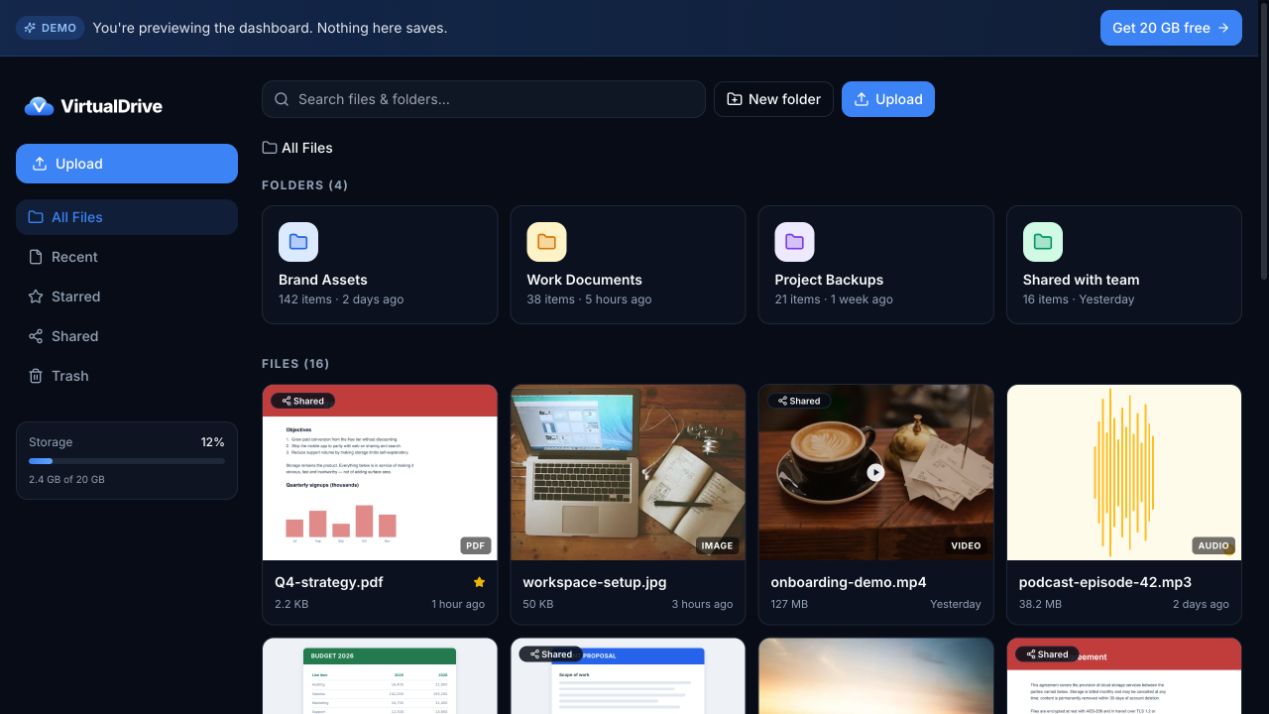
Open the same library on phone and web
VirtualDrive offers web, iPhone and Android access. Its current iPhone listing also describes photo backup, document scanning and offline files. Confirm platform-specific features in each listing; an iPhone feature should not automatically be assumed on Android.

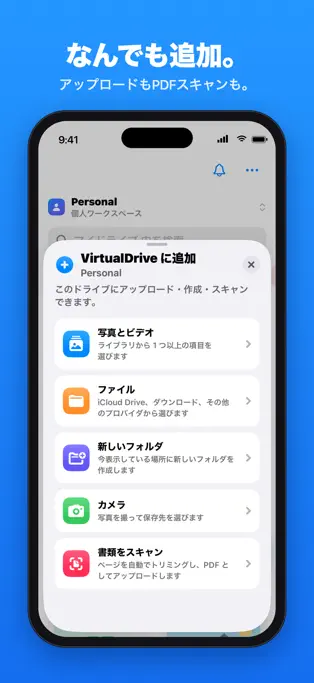

iPhone and iPad / Android / Web
Start with 20 GB — sign up free
Start with an ad-free working collection
VirtualDrive advertises 20 GB free without ads. Start with everyday documents and a small photo folder; test upload, search, download and account recovery before moving important material. Keep an independent backup.
Keep your library separate from the handoff
Your folder structure can remain your working home while you share the particular file a client needs. Check link permissions and expiry before sending, and test the recipient experience in a separate browser.
GigaFile FLY makes this a more interesting comparison
Do not judge the whole GigaFile ecosystem by its older app. The current FLY listing describes downloaded-file organization, on-device AI search and classification, and media editing. Those are useful tools for received content. Decide whether you primarily want an app-managed collection of downloads or an account-based cloud library across devices.



When GigaFile is the better choice
Large production deliveries and one-off video handoffs favor GigaFile’s generous per-file ceiling. The free web service has advertising, and paid ad-free options exist. Neither service needs to replace the other: deliver the large package through a transfer service, then keep the authorized working files you need in your chosen library.
Move one folder before moving everything
- Confirm you have permission to retain the files.
- Download them while the source link works and check that they open.
- Create a dated or project folder in VirtualDrive and upload within your plan’s limits.
- Open the files from a second device and test sharing. Keep your original backup.
This is a manual workflow, not a claim that pasting a GigaFile URL automatically imports an entire account.
Check security and recovery, too
VirtualDrive describes AES-256 at rest and TLS in transit. Its developer page explicitly says this is not end-to-end encryption and that file version history is unavailable. Match your choice to company policy, recovery needs and sharing controls. This article is not evidence that either product is categorically safer.
Frequently asked questions
Can GigaFile be used for long-term storage?
The web transfer has a retention period. GigaFile FLY says saved album images remain available after expiry. Distinguish a retained download from an ongoing cloud library; VirtualDrive is an option when you want the latter across devices.
Is VirtualDrive a complete GigaFile replacement?
No. It can replace a scattered collection of links as your everyday storage workflow, but it is not a replacement for a 300 GB single-file transfer.
What should I check before choosing free cloud storage?
Compare total space, individual file limits, retention conditions, platforms, sharing and export. VirtualDrive advertises 20 GB free; confirm current terms and test a small folder first.
Your next project should start with the files already in reach.
Give the documents and photos you reuse a consistent home.
Sign up for VirtualDrive freeRelated: Top five cloud storage apps for 2027.
Sources and review method
Checked official web interfaces and Japanese App Store listings on November 16, 2026. Total storage and single-file limits are different measures. We did not benchmark transfer speeds or uptime or perform a security audit. Store artwork can differ from the installed app.