
Why Migrate from WordPress to Next.js? An SEO-Safe Migration Guide
Key takeaways
A practical guide to moving a business website from WordPress to Next.js without losing valuable content, URLs, metadata, analytics, or search visibility.
Short answer: migrate from WordPress to Next.js when your website has outgrown a theme-and-plugin architecture and now needs tighter control over speed, security, multilingual SEO, integrations, design, and product features. Do not migrate only because Next.js is newer. A well-maintained WordPress site can rank and perform well, while a poorly planned Next.js rebuild can lose content, break URLs, and damage search visibility.
The strongest reason to migrate is not the framework itself. It is the opportunity to replace accumulated technical constraints with a controlled application architecture. The safest migration preserves what already works, measures what needs improvement, and changes one major variable at a time.
If you are still choosing between platforms, first read our WordPress vs Next.js comparison. This guide is for companies that are already experiencing WordPress limitations and need to understand what a responsible migration involves.
What Changes When WordPress Becomes Next.js?
A traditional WordPress site commonly combines content management, templates, plugins, PHP execution, a database, media, and the public frontend in one system. A Next.js architecture separates those concerns. The public website becomes a React application that can prerender stable pages, render dynamic pages on the server, connect to APIs, and deliver interactive features where they are actually needed.
Content can move to a headless CMS, a database, Markdown, or a custom admin tool. WordPress itself can also remain as a headless CMS while Next.js replaces only the public frontend. The right destination depends on who edits content, how often they publish, which plugins currently hold business data, and whether the site is becoming a Web application.
Seven Reasons a WordPress-to-Next.js Migration Can Make Sense
1. More Control Over Real-World Performance
Next.js can prerender pages, cache appropriate data, optimize navigation, and keep server-only work out of the browser. That can create a fast foundation, especially when a WordPress site is carrying a heavy theme, multiple page-builder layers, and overlapping plugins.
Performance is not automatic. A Next.js site can still be slow when it ships oversized JavaScript, unoptimized images, third-party scripts, or expensive server requests. The correct goal is measurable user experience. Google's current Core Web Vitals use Largest Contentful Paint, Interaction to Next Paint, and Cumulative Layout Shift, with “good” thresholds of 2.5 seconds, 200 milliseconds, and 0.1 respectively at the 75th percentile.
2. A Smaller Public Attack Surface
A static or server-rendered Next.js frontend does not expose the familiar WordPress login, theme, and plugin surface on every public request. This can reduce common plugin-related and administrator-facing risks. It can also make deployment artifacts immutable and easier to roll back.
Next.js is not security-free. Dependencies, APIs, forms, authentication, environment variables, cloud permissions, and custom code still need patching and review. The migration changes the security model from routine WordPress core, theme, and plugin maintenance to disciplined software engineering and cloud operations.
3. Freedom Beyond Themes and Page Builders
Next.js is a better fit when the site needs custom navigation, account areas, pricing tools, dashboards, search, booking, maps, AI features, multilingual journeys, or deep CRM and commerce integrations. The interface can follow the business process instead of being forced into a theme or plugin's assumptions.
4. Precise English and Japanese SEO Architecture
A bilingual business site needs more than translated paragraphs. Each language should have a stable URL, localized title and description, self-referencing canonical URL, reciprocal hreflang annotations, translated navigation, internal links, structured data, and an XML sitemap that exposes both versions.
Next.js provides server-side metadata APIs and programmatic sitemap, robots, Open Graph, and route conventions. These tools make technical SEO explicit in the codebase. They do not replace keyword research or useful content, but they make language parity easier to verify.
5. Cleaner Integrations and Product Development
Many WordPress sites begin as marketing pages and gradually acquire forms, memberships, customer portals, calculators, external databases, mobile-app APIs, and automation. When plugins become the glue between unrelated systems, debugging and change management become difficult. Next.js can place those workflows behind typed APIs and reusable components that are tested as part of one application.
6. Safer Release and Rollback Workflows
Modern hosting can create a preview URL for each proposed change, run a production build before launch, and keep previous deployments available for rollback. Marketing, legal, and management teams can approve a real preview instead of checking an unfinished WordPress page inside the production CMS.
7. A Better Foundation for Long-Term Web Application Growth
If the roadmap includes authentication, subscriptions, live data, an admin portal, mobile integration, or AI, rebuilding the public experience in Next.js can avoid maintaining a separate marketing site and product frontend. Shared design components, analytics, identity, and APIs can evolve together.
When You Should Not Migrate
Migration is not the right answer for every business. Keep WordPress when the current site is stable, fast enough for real users, inexpensive to maintain, and heavily dependent on a non-technical editorial team. A simple publication or company site may gain little from a custom application stack.
- Editors depend on the WordPress block editor: replacing it without a suitable CMS can make daily work worse.
- Critical features depend on mature plugins: ecommerce, memberships, bookings, learning systems, or multilingual workflows may be expensive to reproduce.
- The business has no ongoing development owner: Next.js needs responsible maintenance, testing, and deployment.
- The problem is only poor hosting or one bad theme: a focused WordPress performance repair may cost less and create less risk.
Three Practical Migration Architectures
| Approach | Best for | Main tradeoff |
|---|---|---|
| Full migration | Companies replacing WordPress, its plugins, and its frontend with a new CMS or application | Most control, but content and editorial workflows must be rebuilt or migrated |
| Headless WordPress + Next.js | Editorial teams that want to keep WordPress while modernizing the public website | Familiar editing, but two systems, preview, caching, and API reliability must be managed |
| Phased or hybrid migration | Large or high-traffic sites that need to reduce launch risk | Safer validation, but temporary routing and operational complexity |
WordPress provides a structured REST API for retrieving posts, pages, media, taxonomies, authors, and supported custom content. That makes it useful for export or a headless architecture. However, plugin shortcodes, page-builder layouts, custom fields, form submissions, redirects, and proprietary plugin data often need separate migration logic.
How to Protect SEO During the Migration
Google's site-move guidance is straightforward: prepare and test the new site, create a mapping from old URLs to new URLs, use server-side permanent redirects, and monitor both sides after launch. Google also recommends changing one major thing at a time where possible and warns that temporary ranking fluctuations can occur while pages are recrawled and reindexed.
Build a Complete URL and Content Inventory
Crawl the current site before writing the new route structure. Export indexed pages, blog posts, category and tag archives, media URLs, PDFs, canonical URLs, title tags, descriptions, headings, structured data, internal links, backlinks, traffic, conversions, and current response codes. Search Console and analytics data reveal which URLs are valuable even when the page looks old.
Preserve Good URLs and Map Every Changed URL
Keeping an existing URL is usually simpler than redirecting it. When a URL must change, map it to the most relevant replacement and use a server-side 301 or 308 permanent redirect. Avoid sending every deleted page to the homepage. Pages with no equivalent should return a genuine 404 or 410.
Maintain On-Page Meaning
Carry over the useful content, title, description, headings, image alt text, internal links, structured data, and conversion intent. A new visual design should not accidentally remove the text and entities that helped search engines and customers understand the page.
Verify Canonical, Hreflang, Sitemap, and Robots Rules
Each indexable page should declare the correct canonical URL. English and Japanese equivalents should reference each other with consistent hreflang. The XML sitemap should list canonical indexable URLs, and production robots rules must not preserve a staging block or noindex directive.
Test Rendered HTML, Not Only the Browser Screen
Important titles, descriptions, headings, article copy, links, and structured data should be available in server-rendered or prerendered HTML. A page that appears after client-side JavaScript runs can look correct to a developer while exposing incomplete initial content to other systems.
Launch with Monitoring and a Rollback Plan
Test desktop and mobile layouts, Japanese typography, forms, analytics, consent tools, redirects, status codes, page speed, and accessibility before launch. Submit the new sitemap, inspect important URLs in Search Console, watch 404 and server logs, compare organic landing pages, and keep the prior deployment recoverable until the new site is stable.
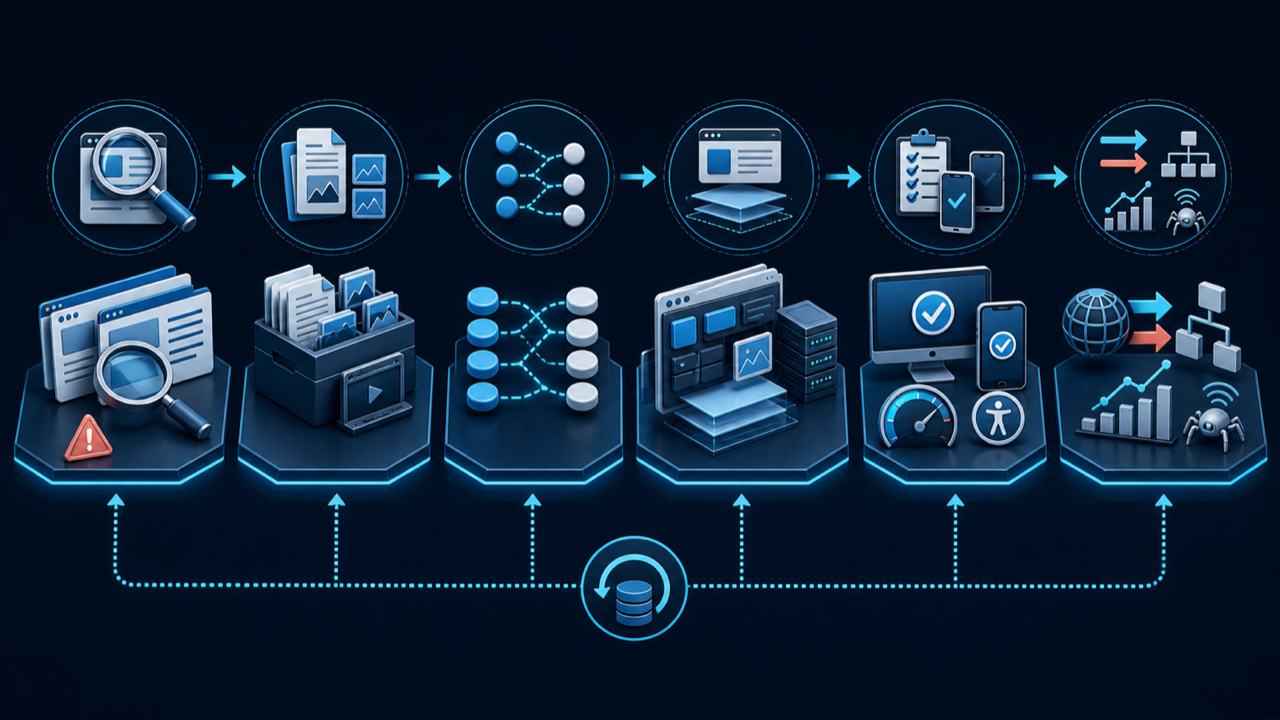
A Six-Stage WordPress-to-Next.js Migration
- Audit: understand traffic, rankings, content, plugins, integrations, performance, and security obligations.
- Inventory and map: define every content type, media asset, URL, redirect, metadata field, form, and business workflow.
- Choose the destination: select full migration, headless WordPress, or another CMS based on the editorial team.
- Build and import: create reusable Next.js components, import clean content, and reproduce required functionality without copying obsolete complexity.
- Quality assurance: compare old and new crawls, validate SEO, accessibility, mobile Safari, forms, analytics, structured data, and Core Web Vitals.
- Launch and monitor: enable permanent redirects, publish the sitemap, monitor Search Console and analytics, fix gaps, and retain rollback capability.
What Japanese Companies Should Check
Japanese corporate websites often contain long legal names, Japanese addresses, department-specific inquiry forms, downloadable PDFs, recruitment pages, privacy notices, and approval-sensitive content. These are not secondary details. The migration specification should include Japanese line breaking, mobile Safari, full-width characters, form confirmation and error states, email delivery, local business information, and Japanese-English content ownership.
For local search, keep the company name, address, phone number, service areas, and organization schema consistent. If the company serves Tokyo, Kanagawa, Osaka, Hokkaido, or other regions, describe those service relationships accurately rather than creating thin location pages with nearly identical text.
How Long and How Much Does Migration Cost?
There is no honest fixed answer without an audit. A small corporate site with clean pages is different from a publication with thousands of articles, Elementor layouts, WooCommerce, memberships, multilingual plugins, custom post types, and years of media.
Cost is driven by the number of unique templates, content volume, plugin replacements, CMS choice, design changes, integrations, redirect count, bilingual requirements, data cleanup, accessibility, testing, and post-launch monitoring. Ask for a discovery phase that produces a route map, content inventory, architecture decision, risk register, and acceptance criteria before committing to the full rebuild.
Final Recommendation
Migrate from WordPress to Next.js when the current platform is constraining business growth and the company is ready to own a modern software product. Keep WordPress when it already supports the editorial workflow efficiently. Use headless WordPress when editors need the CMS but the public frontend needs stronger control.
The winning migration does not erase the old website. It preserves its search equity, content knowledge, customer paths, and operational lessons, then rebuilds them on a cleaner foundation.
Planning a WordPress-to-Next.js Migration?
IT Support in Tokyo can audit your WordPress site, map every URL, preserve English and Japanese SEO, migrate content and media, rebuild the frontend in Next.js, and monitor the launch. Request a bilingual migration consultation or review our Web development services in Japan.